The Complete Guide to Choosing the Right Employee Transport Management System for Modern Businesses
Manual employee shuttle management is nearly impossible to sustain, given the hybrid schedules, rising fuel costs, and tighter safety expectations users have today. An employee transport management system takes over all the important parts. It handles booking, tracking, and reporting, and puts them in one place operations teams can actually rely on. Below, we’ll look at what these systems do, why so many companies are adopting them right now, and how to shortlist a vendor without getting swept up in a slick demo.
What Is an Employee Transport Management System?
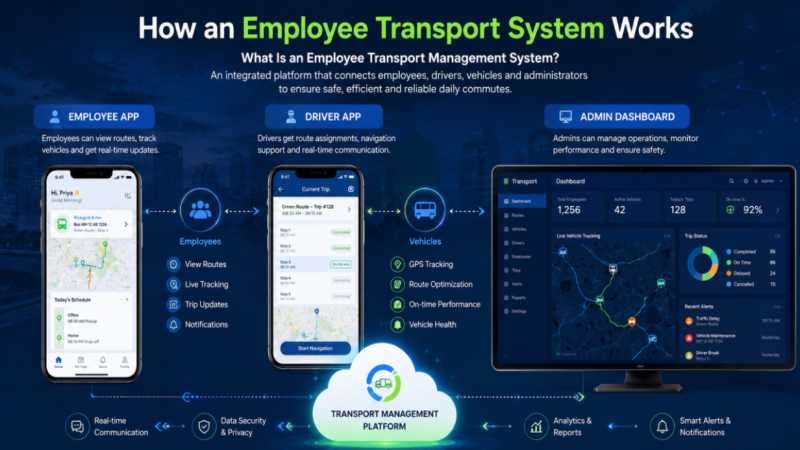
Strip away the marketing language, and an employee transport management system is fairly simple to describe. It’s software that plans, runs, and monitors company commute operations from a single dashboard. Most employee transport management software in this space is built around three connected pieces.
- An employee app, where riders book trips, check routes, and request an unscheduled ride if plans change last minute
- A driver app that lays out assigned trips, navigation, and earnings, so nobody’s driving blind
- An admin dashboard for approving requests, building rosters, and pulling the reports leadership actually asks for
What separates this from a generic fleet or logistics tool is who it’s designed around. Logistics software optimizes for cargo showing up on time. This kind of employee transportation solution has to account for a tired employee waiting at 9 PM, wondering if their ride is still coming, and whether anyone even knows where they are. Some vendors offer cloud and on-premise deployment side by side too, so IT teams aren’t forced to give up control over data just to get better software.
Why Businesses Are Investing in Commute Software Now
Timing rarely happens by accident, and this feels like one of those moments where several pressures hit at once. Employees now expect live tracking and a way to flag trouble immediately, not a vague ETA and a shrug if something goes wrong. Good employee commute management has become a real retention factor without anyone quite planning for it, and we’ve talked to HR leaders who bring up commute friction almost as often as pay when explaining attrition.
Fuel costs go up and down without much warning, maintenance bills keep coming, and a half-full shuttle running the same route every day is burning money nobody’s tracking closely. Most companies don’t catch this until finance actually sits down and audits the numbers. Switching to demand-based routing instead of a fixed printed schedule usually closes that gap within a few months.
Then there’s the return-to-office factor. Hybrid schedules mean ridership swings wildly, full one week and a third of that the next, and a system built around manual planning just can’t flex with that kind of unpredictability. Software that reads demand and adjusts routing on its own handles this far better than a coordinator juggling spreadsheets.
None of this even gets into duty of care. Businesses are increasingly expected to be ready with protocols and documentation for moments of breakdown, accident, etc. Emergency response tools used to be optional. They’re closer to a baseline requirement now.
Key Features to Look For Before You Buy
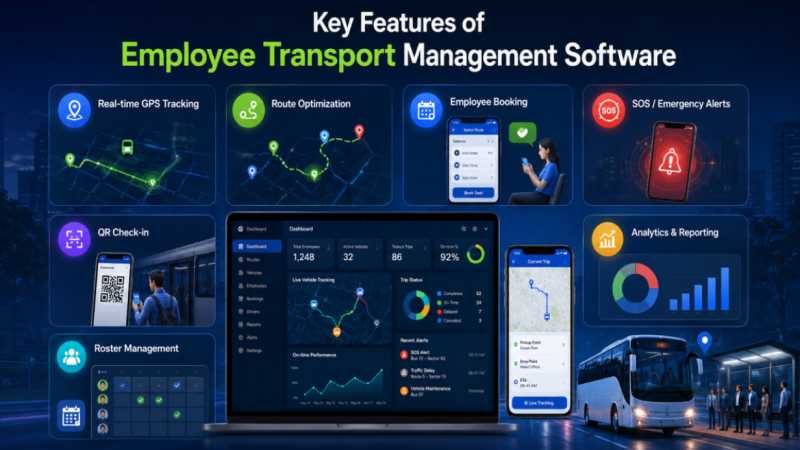
Vendors tend to lead with the features that demo well. For instance, the maps, the push notifications, or the polished app screens. What actually protects your business shows up less often in a sales pitch, buried in how the system handles the messy, unplanned moments.
Analytics and Reporting
- Automated reports on trip costs, route efficiency, and vehicle usage, pulled without anyone manually exporting a spreadsheet
- Performance metrics that flag which routes are underused or consistently running late
- Audit-ready trip logs, useful when compliance or finance asks for a full record instead of a summary.
- Surface the numbers that matter: cost per route, on-time performance, driver reliability, without someone having to dig for them.
Real-time tracking and visibility
- Live GPS on vehicles and drivers, visible to admins and riders alike, matters more than it sounds until you’re the one fielding a call from a worried manager asking where a shuttle went.
- QR-based check-ins confirm boarding without relying on a driver remembering to mark it, and full trip history means nobody’s guessing what happened on a given route.
Safety and emergency response
- An SOS function needs to alert the right people the moment it’s triggered, not after some delay buried in a queue.
- Number masking keeps personal phone numbers private between riders and drivers, which sounds minor until you consider what happens without it.
- Safe drop confirmation, through OTP or an automated call, gives families and admins a way to know someone got home.
- These are the features used on someone’s worst day, not an average one, so they deserve real scrutiny before any contract gets signed.
Route and roster optimization
- Through self-rostering, employees can comfortably manage their own schedules within company regulations. Ad-hoc requests, on the other hand, cover the days that don’t follow the usual pattern.
- Automated routing adjusts as pickup points and headcounts change, as opposed to time-consuming manual replanning. Shuttle transportation solutions can help businesses manage these operations more efficiently.
- None of these features do much in isolation. Tracking, safety, routing, and other features operate in sync through a single dashboard, sharing data and optimising performance.
Employee Transport Software vs. Manual Coordination
Side by side, the gap is easier to see than it is to explain in the abstract. Spreadsheets and phone trees hold up fine when a company has twenty people on one shuttle route. Somewhere past a couple hundred employees, that approach starts breaking down in ways that are hard to patch with more effort.
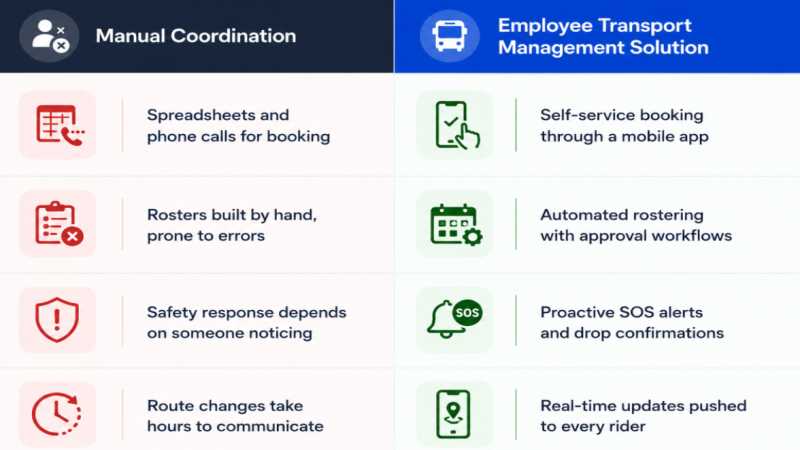
Manual coordination only kicks in once something’s already wrong: a bus is late, a rider didn’t show, someone’s stuck without a ride home. Software built for this catches most of that earlier, sometimes before the rider even realizes there was a problem. That’s usually the moment operations leaders stop debating and just make the switch.
How to Evaluate and Choose the Right Vendor
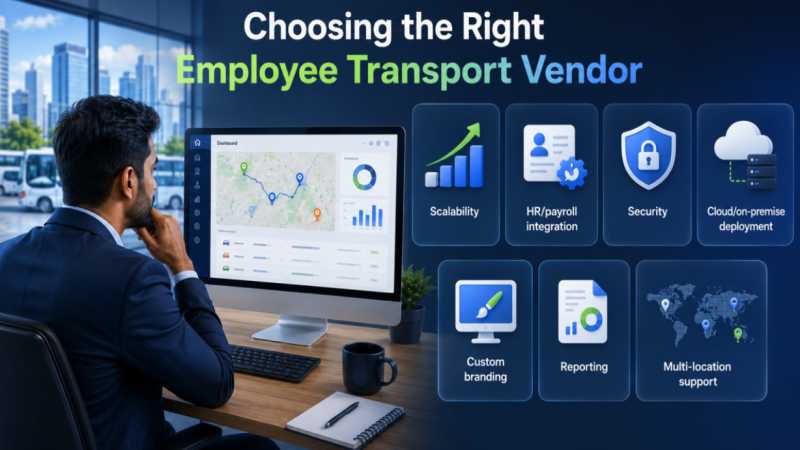
Once you’ve decided software is worth it, the harder job is picking who to buy from. A few things are worth checking before you sign anything.
- Ask if the platform can carry your branding, logos, and colors, and whether it handles multiple languages if your teams are spread across regions.
- Push on integrations early. If it can’t talk to your HR or payroll systems, you’re just moving the manual work somewhere else instead of getting rid of it.
- Look for SOC 2 Type II and ISO 27001. They’re not just badges on a website. Ask when the vendor was last audited, and don’t settle for a vague answer.
- Figure out whether you need cloud, on-premise, or both. Some IT teams don’t have a choice here because of compliance, and a good vendor won’t treat either option as a lesser tier.
The simplest test can sometimes be to monitor the response of the vendor’s team whenever you ask about your specific situation rather than their standard pitch. A system built for a hundred-person office isn’t going to work the same way for something like airline crew logistics, and a vendor worth your time will tell you that upfront instead of promising it fits everyone.
Bringing It All Together
Most companies don’t give this decision enough time, honestly. The ones who get it right treat commute software as part of how they keep people safe and keep them from leaving, not something to check off a list in a rush.
Let me know if any of these still feel off, especially the checklist section since that one had the most rigid structure before. See more